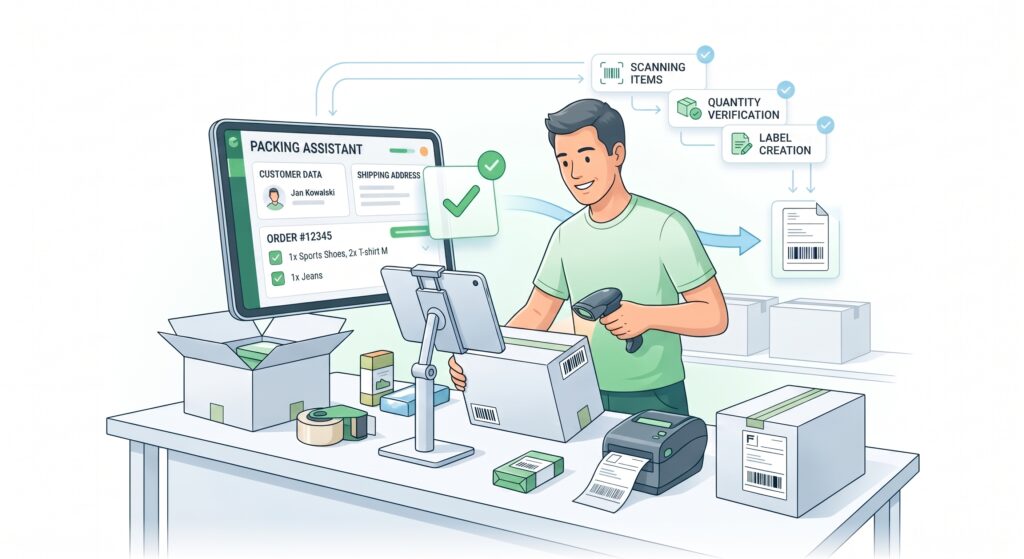
Efficient preparation of orders for shipment is crucial in e-commerce sales. The packing assistant in Ordeno was designed to simplify and speed up the order picking and packing process as much as possible, while minimizing the risk of errors.
The system guides the user step-by-step through consecutive orders, displaying all necessary information in a simple and readable interface.
Các tính năng tích hợp Allegro với Ordeno
Clear order view
After collecting the products, e.g., using the picking assistant, the system automatically moves to the packing stage. Each order is displayed separately with a list of all products that should be included in the package.
The packing view provides access to, among other things:
product list with photos
product name and SKU
quantity of ordered items
price and order summary
basic customer details
shipping method
As a result, the packer has all key information in one place.
An ideal solution for packing stations
The packing assistant interface was designed to work seamlessly on large touchscreens used at packing stations. A simple layout, large buttons, and clear data presentation make operating the system fast and intuitive.
Product quantity control
For each product in an order, item completion can be confirmed using simple buttons. If a customer bought multiple units of a product, the system shows picking progress.
For example:
product ordered in a quantity of 3 units
after the first confirmation, 1 / 3 appears
after the next, 2 / 3
up to the full 3 / 3
This allows the packer to see exactly how many units of a product have already been packed and how many still need to be added to the parcel. This system significantly reduces the risk of mistakes.
Packing with a barcode scanner
Alternatively, products can be confirmed by scanning barcodes. Simply scan the product code with a barcode reader for the system to automatically credit that item to the order.
This solution allows you to:
ensure that the correct product is packed
automatically count the number of units
speed up the packing process
reduce errors
This ensures that the customer receives exactly what they ordered.
Integration with automations
The packing assistant can work alongside the automatic actions system. This means that after a specific action is performed, the system can automatically launch subsequent processes.
For example, after packing is completed, you can automatically:
print a courier label
print a receipt or invoice
change the order status
send a message to the customer
It is also possible to create dedicated buttons that perform specific operations with a single click, such as printing documents or generating a shipment.
Faster packing and fewer errors
Thanks to a structured process, scanner integration, and automations, the packing assistant in Ordeno allows you to significantly speed up order preparation for shipment.
The result is:
faster order fulfillment
fewer mistakes
fewer customer disputes
a more organized warehouse workflow
It is a tool that genuinely improves the daily work of order processing teams.